













What Is a Desktop Radar?
A desktop radar is dedicated desk hardware that shows live aircraft on a display you can leave running. This guide explains the category, how it differs from phone and browser flight-tracking apps, and what purpose-built hardware is for.
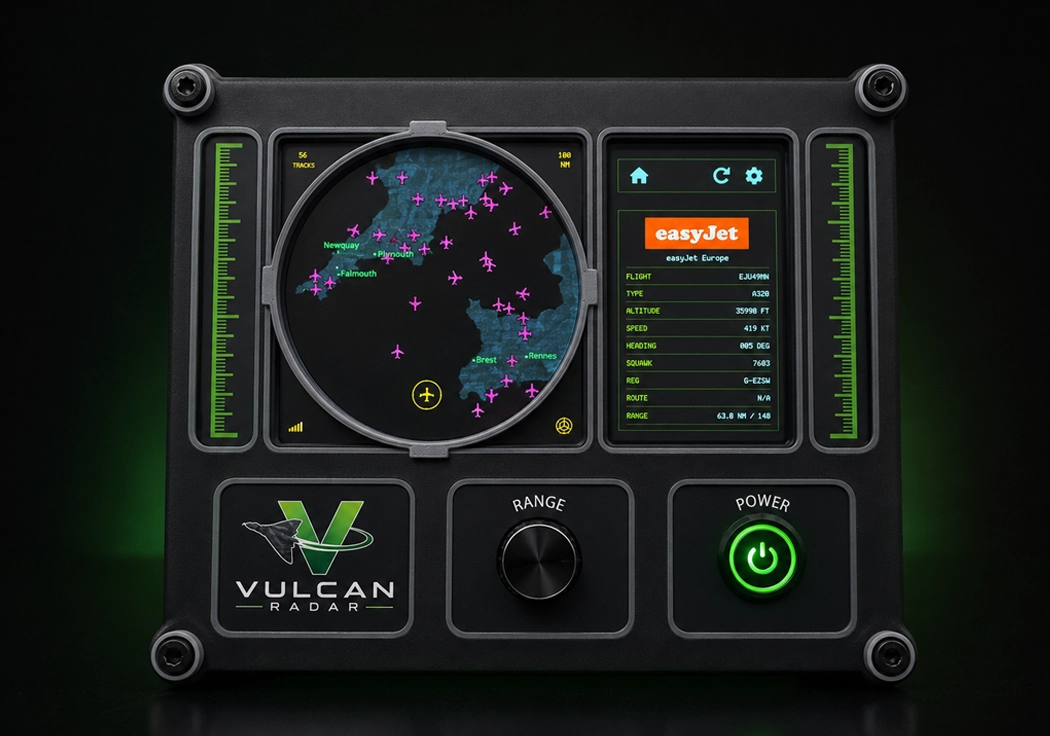
What “desktop radar” means
In enthusiast use, a desktop radar is not a spinning marine scanner and not an air traffic control console. It is a compact desk instrument that shows live aircraft around a chosen location on a screen you can read at a glance.
The live picture is almost always ADS‑B–derived data delivered over Wi‑Fi, presented in a radar-style view. The unit does not emit radar pulses. People look for a desktop radar when they already enjoy watching the sky and want that picture to stay in the room, rather than unlocking a phone each time a flight goes over.
Desktop radar vs phone and browser flight tracking
A phone or browser map is a research tool. You open it, search a callsign or an arrival, then put it away. A desktop radar is always-on tracking at home or in the office: you set a location once, leave the unit powered, and watch arrivals, departures, and overflying traffic without starting another session.
Phone maps such as Flightradar24 remain better for worldwide browsing on the move. You do not need to replace them. A dedicated desk display complements those apps: it is a fixed screen in the room, not another notification competing with the phone in your pocket.
How live aircraft appear on a desktop radar
Live traffic is ADS‑B–derived. Coverage varies with the underlying aircraft data, in the same way enthusiast maps do. You can centre the picture on a place you care about — a home airport, a holiday coordinate, or a simulator scenery location — and nearby aircraft appear as moving tracks.
That is useful for personal awareness of the local sky. It is not a certified traffic display, not a navigation source, and not a substitute for air traffic control.
What dedicated desktop hardware offers
The point of dedicated hardware is a tactile, glanceable instrument: a fixed display and physical range control, rather than a tablet running a website. When you compare desktop radar hardware, look for a screen you can read without leaning in, obvious range control, and a product model that does not depend on a new consumer subscription just to keep the picture alive.
Vulcan Radar is one example of that category: a UK-made desk unit with a 5-inch display, tactile range control, and live aircraft over Wi‑Fi. It is enthusiast hardware, not certified ATC equipment. Never use a desktop radar for navigation or air traffic control.
Personal situational awareness only
A desktop radar is for personal situational awareness and enjoyment. Keep operational decisions on official channels. The live picture is an enthusiast view of nearby traffic, not a tool for flying, controlling, or safeguarding aircraft.
Desktop radar FAQs
Is a desktop radar “real radar”? No. A unit such as Vulcan Radar does not emit a radar pulse. It displays third-party ADS‑B–derived traffic on a radar-style screen.
Should I stop using Flightradar24? No. Phone and browser maps remain the right tool for mobile use and worldwide browsing. Dedicated desktop hardware is for the hours you are already at a desk.